Houzz Pro Review (2026): Worth It for Design-Build Firms?
Disclosure: This article contains affiliate links. If you sign up through them, StackVett may earn a commission at no extra cost to you. Our reviews and rankings are not influenced by these partnerships – see our full Affiliate Disclosure for details.
Most construction software gets one thing right and asks you to live with what it gets wrong. Buildertrend gives you scheduling depth but no leads. JobTread gives you clean job costing but minimal design tools. Procore gives you enterprise control at enterprise prices.
Houzz Pro takes the opposite approach. It puts almost everything in one place – lead generation, 3D design, mood boards, client portal, estimates, invoicing, project timelines – and integrates it all with the Houzz marketplace, which sees over 65 million homeowners every month.
For a residential designer, a design-build remodeler, or a small custom builder who competes on design quality, that combination is genuinely hard to match. For a contractor who needs serious scheduling depth, real job costing, and crew-level field management, the math works differently.
This review covers what Houzz Pro does exceptionally well, where it falls short, and which contractors it actually serves best in 2026.
⚡ QUICK RECOMMENDATION
Houzz Pro is the strongest platform for design-build firms and residential designers who compete on visual presentation
Starting at $149/month (Essential plan for designers) or $249/month (Pro plan for contractors), with a 30-day free trial and access to the Houzz marketplace audience. If your business wins jobs through design quality, mood boards, 3D renderings, and client experience, Houzz Pro covers nearly everything you need. If you need deep scheduling, real job costing, and field crew tools, JobTread or Buildertrend will fit better.
Start 30-Day Free Trial → Compare Alternatives →
No credit card commitment for trial. 12-month annual contract begins after trial ends.
What Houzz Pro Is and Who It’s Built For
Houzz Pro is a cloud-based business management platform built specifically for residential design and remodeling professionals. The platform combines four things that most competitors handle separately.
Lead generation through the Houzz marketplace, where over 65 million homeowners search for designers and contractors each month.
Visual design tools including 3D floor planners, mood boards, photorealistic renders, and a product clipper that builds material libraries from across the web.
Client-facing project management including estimates, invoicing, online payments, client dashboards, change orders, and contracts.
Marketing tools including custom websites, email marketing, premium profiles, and targeted advertising packages.
The combination is what makes Houzz Pro distinctive. A residential designer using Houzz Pro can attract a homeowner lead from the marketplace, build a 3D mood board to win the project, send a branded estimate, collect a deposit, and manage the project through completion – all without leaving the platform.
The tradeoff is that Houzz Pro’s project management depth is lighter than what dedicated construction platforms offer. Schedules are basic timelines without task dependencies or Gantt views. Job costing is limited to estimates versus invoices. There is no GPS time tracking, no advanced crew assignment, and no offline mobile capability for field workers.
✓ Houzz Pro fits if you are:
- A residential interior designer or architect
- A design-build remodeling firm that competes on visual quality
- A custom home builder serving homeowners directly
- A kitchen and bath remodeler doing $250K to $5M in annual project volume
- Looking for one platform that handles lead generation, design, and client-facing project management
- Comfortable with an annual commitment in exchange for marketplace access
✗ Houzz Pro doesn’t fit if you are:
- A commercial GC running multi-stakeholder projects
- A contractor who needs serious scheduling with task dependencies and crew management
- A construction company that needs real job costing and budget tracking
- A field-heavy operation where crew needs offline mobile access on remote sites
- Cost-sensitive and prioritize the lowest possible monthly subscription
Pricing and the Annual Commitment
Houzz Pro does not publish exact pricing on its main pricing page, but verified data from third-party research and direct contractor reports puts the structure at:
Plan Monthly Price Best For
Essential $149/month Designers and small design firms (up to $250K annual project volume)
Pro $249/month Contractors and builders ($250K to $500K annual project volume)
Custom Custom quote Larger firms ($5M+ annual volume) with multiple users
Additional users on Essential and Pro plans cost $60 per seat per month. The Custom plan negotiates user seats individually.
The 30-day free trial does not require a credit card, but signing up after the trial begins a 12-month contractual commitment. Several verified user reviews report difficulty cancelling before the annual renewal window. If you sign up, mark the cancellation deadline on your calendar before you reach the 30-day mark.
Optional advertising packages start at $499 per month and provide targeted local advertising to homeowners searching on Houzz. This is a separate add-on from the core software and is what most contractors mean when they say their “Houzz Pro bill” runs $500 to $700 per month.
The advertising package is a separate commitment from the core software subscription, and the ROI is significantly more variable. Multiple verified contractor reports describe spending $300 to $700 per month on the advertising add-on for 6 to 12 months without measurable lead conversion. Some users describe difficulty cancelling the advertising package mid-contract, with cancellation requests going unanswered until payment was stopped at the bank level.
If you sign up for Houzz Pro, treat the core software subscription ($149 or $249/month) and the advertising add-on ($499+/month) as two separate decisions. The core software is what generates value for designers and design-build firms. The advertising add-on is a separate marketing investment that should be evaluated like any other ad spend – with a baseline expectation, a tracking system, and an exit plan.
The Features That Matter Most for Designers and Remodelers
Lead Generation Through the Houzz Marketplace
This is the feature no competitor can match at any price. Houzz is the largest residential design platform on the internet, with over 65 million monthly active homeowner users. Houzz Pro subscribers get a premium profile that appears in homeowner searches, complete with portfolio photos, client reviews, and direct contact options.
The lead quality varies dramatically by market and business type. Some contractors in major metropolitan areas with strong portfolios report meaningful inbound flow. Others, including verified Contractor Talk forum members, report spending $1,800 to $5,000+ on the paid advertising program without receiving a single qualified lead during their contract term.
The pattern that emerges from contractor forums is consistent: kitchen and bath remodelers, residential designers, and design-build firms with strong photo portfolios tend to see more reliable lead flow. Custom home builders, smaller-market contractors, and trades like roofing or framing tend to see far less return on the same spend.
The free Houzz profile is genuinely valuable on its own. One verified contractor on Contractor Talk reported receiving approximately 190 project inquiries annually from his free Houzz page in a major metropolitan market. Before committing to the paid advertising upgrade, the free profile is worth setting up and running for several months to gauge baseline lead flow in your specific market.
3D Floor Planner, Mood Boards, and Visual Tools
The design tools are where Houzz Pro genuinely excels and where users consistently report the most satisfaction.
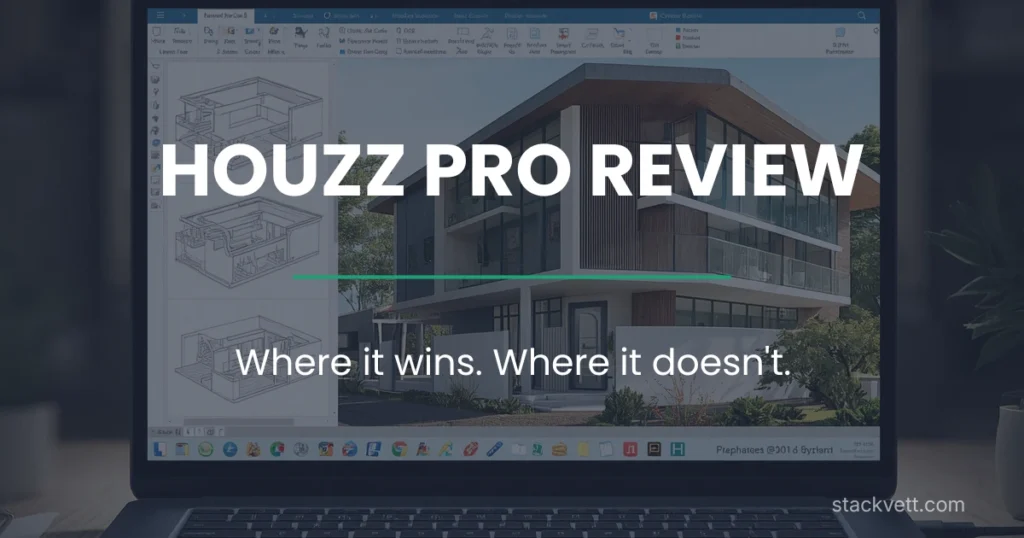
The 3D floor planner converts 2D drawings into photorealistic 3D renders. Designers can show homeowners exactly what a finished space will look like before any work begins. The mood board tool lets you compile inspiration imagery, paint colors, finish samples, and product selections into a single visual presentation.
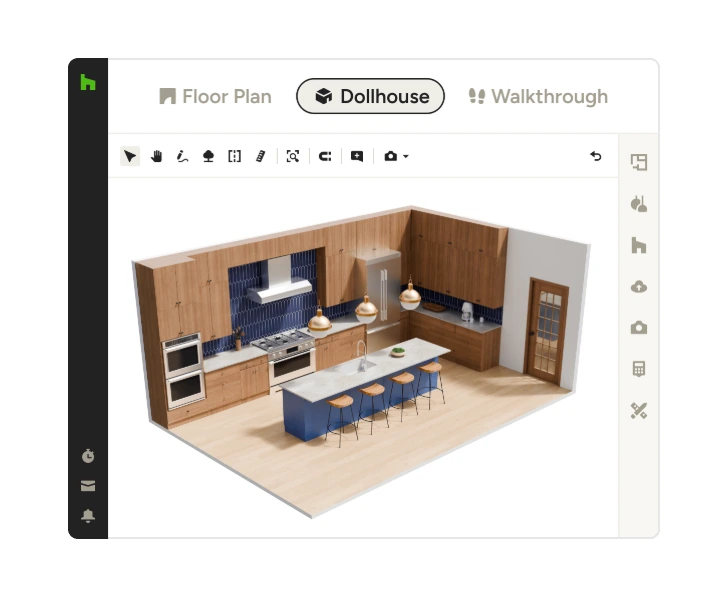
The product clipper is a browser extension that captures products from any website – Wayfair, Houzz Shop, Benjamin Moore, vendor catalogs – and adds them directly to your project library. For a designer juggling client selections across dozens of vendors, this saves real hours every week.
The Houzz AI tools layer on top of these, generating renderings from text prompts and helping accelerate concept development. Whether these add genuine value or just marketing polish depends on how much you rely on visual presentation to win projects.
Estimates, Invoicing, and Financial Tools
Houzz Pro’s financial suite covers what a design-build firm needs day to day:
- Estimates with cost catalogs and assemblies for grouped line items
- Branded proposals that homeowners can review, comment on, and approve online
- Online payment acceptance via credit card, debit card, or ACH
- Change orders, invoices, and purchase orders
- QuickBooks Online integration for accounting sync
The QuickBooks integration has improved over the years but is not without friction. Some users report sync errors that require manual reconciliation. If accounting accuracy matters to your operation, plan time for setup and ongoing monitoring of the sync.
Client Dashboard and Communication
The client dashboard is one of the features homeowners consistently mention positively. They can log in to view project status, review and approve change orders, access invoices, and see selection decisions in one place. For a designer working with homeowners who want to feel involved without daily phone calls, this is real value.
The dashboard is configurable – you control exactly what the client sees. Internal team notes, vendor pricing, and margin calculations stay invisible while the client experience feels polished and transparent.
Project Management – Where the Depth Runs Out
This is where Houzz Pro’s limits become clearest, and where the review needs to be honest.
Schedules in Houzz Pro are basic timelines. You can create tasks, set dates, and share the timeline with clients. You cannot set task dependencies, build Gantt charts, manage multiple crews across overlapping projects, or run resource allocation across your business. For a simple linear remodel, the schedule tool works. For a multi-phase project with overlapping trades and shifting timelines, it is not sufficient.
Job costing is similarly light. You can see estimate-to-invoice tracking but not real-time cost-to-budget views, no crew-level cost attribution, no purchase order-to-budget reconciliation. Contractors who need to know whether each active job is profitable today, not at closeout, will find this gap significant.
The mobile app handles client communication and basic project access but is not built for field workers. Daily logs and time tracking exist but with reported limitations. Multiple user reviews mention measurement and editing functions only working reliably on desktop.
If your business model depends on running 8 to 15 simultaneous jobs with field crews, daily cost tracking, and dependency-based scheduling, Houzz Pro will feel undersized. This is the structural reason most users who outgrow Houzz Pro move to JobTread, Buildertrend, or a similar dedicated construction platform.
What It Does Well and Where It Falls Short
Pros
- Direct access to the Houzz marketplace – 65M+ monthly homeowner users
- Industry-leading 3D rendering and mood board tools
- Premium profile, custom website, and built-in marketing tools
- Polished client dashboard that homeowners genuinely use
- QuickBooks Online integration for accounting sync
- All-in-one – design, marketing, CRM, and light PM in one platform
- 30-day free trial with no credit card required
- Strong G2 ratings for design tools and ease of use
Cons
- Annual 12-month commitment with reported cancellation difficulty
- Pricing reported as high relative to project management feature depth
- No task dependencies or Gantt charts in scheduling
- No real-time job costing or crew-level cost tracking
- Mobile app limited compared to field-first competitors
- Advertising add-on ($499+/month) has highly variable ROI – verified user reports include spending $1,800 to $5,000+ without measurable leads
- Cancellation of advertising package described as difficult by multiple users (Contractor Talk, G2, Capterra)
- Auto-renewal from monthly to annual has surprised some users
- QuickBooks sync errors reported by some users
- Customer support quality reported as inconsistent
Want to see how Houzz Pro stacks up against JobTread, Buildertrend, and Procore before committing? Our free Excel comparison tool scores five major platforms against your specific business priorities in about 5 minutes.
How It Compares to the Main Alternatives
The headline numbers tell most of the story. Houzz Pro’s $149/month Essential plan is the lowest entry point of the four, but the comparison only works if you place real value on the Houzz marketplace lead access and the 3D design tools. Strip those out, and a residential builder gets more pure project management functionality from Buildertrend or JobTread at a similar or only slightly higher price.
JobTread in particular is worth comparing directly. At $159/month on the annual plan, with cleaner job costing, faster onboarding, and a 30-day money-back guarantee, it has emerged as the most common alternative for contractors leaving Houzz Pro.
Is Houzz Pro Worth It for Your Business?
For a residential designer, design-build firm, or kitchen and bath remodeler whose business model depends on visual presentation and homeowner-facing client experience, Houzz Pro is worth a serious trial. The combination of marketplace lead access, 3D design tools, and client dashboard is genuinely hard to replicate with any other single platform.
A critical distinction matters here. The core Houzz Pro software – design tools, mood boards, 3D renders, client dashboard, estimates, invoicing – is genuinely well-built and earns its place at $149 to $249 per month for the right firm. The paid advertising add-on ($499+/month) is a different decision. Treat it as a separate marketing experiment, run it for 90 days with clear tracking, and exit if the lead flow does not justify the spend. The core software can deliver value even if the advertising program does not.
For a remodeler running 4 to 8 active jobs at any time with a small crew, the Pro plan at $249/month is a reasonable investment if you also value the marketing exposure. The 30-day free trial removes the risk of testing it on real projects, provided you cancel before the annual contract begins if it is not the right fit.
For a small general contractor focused primarily on project execution and crew management – especially one running multiple simultaneous jobs with active cost tracking – Houzz Pro will likely feel undersized within a few months. JobTread or Buildertrend will fit that workflow better at similar pricing.
For a large commercial general contractor, Houzz Pro is not a serious option. Its design-and-residential focus means it does not address the complexity that platforms like Procore exist to handle.
We rate Houzz Pro 4.0 out of 5 for residential designers and design-build firms, where its marketplace access and design tools justify the price. For pure construction project management without the design or marketing emphasis, we rate it 3.0 out of 5.
Ready to test it on real projects? The 30-day free trial requires no credit card and gives full access to Essential or Pro plan features. By day 30, you’ll know whether the marketplace, design tools, and client experience justify the annual commitment.
IF YOU NEED MORE PROJECT MANAGEMENT DEPTH
JobTread covers the same residential market with deeper job costing and cleaner scheduling
Houzz Pro is the strongest option if you compete on design quality and homeowner experience. If your business needs serious job costing, real-time budget tracking, and a 30-day money-back guarantee instead of an annual commitment, JobTread fits a different profile — at $159/month annual or $199/month monthly. Different platform, different strengths, but worth comparing if Houzz Pro’s project management features feel light for your operation.
Frequently Asked Questions
Is Houzz Pro just for interior designers, or do contractors use it too?
Both. The Essential plan ($149/month) is positioned for designers and small design firms. The Pro plan ($249/month) is positioned for contractors and builders. Both plans include the same core platform – design tools, marketplace access, CRM, and project management – with differences in project volume limits and certain advanced features.
Does Houzz Pro have a free trial?
Yes. All plans include a 30-day free trial with no credit card required. The annual contract begins automatically at the end of the trial unless you cancel before day 30.
How does the Houzz marketplace lead generation actually work?
Houzz Pro subscribers get a premium profile that appears in homeowner searches on Houzz. Homeowners can browse your portfolio, read reviews, and contact you directly through the platform. The optional advertising package ($499+/month) puts your profile in front of more targeted homeowners in your specific local market. Lead quality varies by region – some users report strong inbound flow, others report mostly tire-kickers.
Can I cancel Houzz Pro if I don’t like it after the trial?
You can cancel during the 30-day free trial without any commitment. After the trial ends, you enter a 12-month annual contract that several user reviews describe as difficult to cancel mid-term. If you are unsure about the platform, set a calendar reminder for day 28 of your trial to make your decision before auto-renewal triggers.
A separate cancellation issue applies to the advertising add-on package. Multiple verified user reports on Contractor Talk, G2, and Capterra describe sending cancellation requests that went unanswered for weeks or months, with billing continuing in the meantime. The pattern users describe is that cancellation gets addressed only after payment is stopped at the bank level. If you sign up for the advertising package, document your cancellation request in writing (email or written letter), keep timestamped copies, and treat any unanswered cancellation request as a billing dispute candidate from day one.
Does Houzz Pro integrate with QuickBooks?
Yes. The Houzz Pro QuickBooks Online integration syncs estimates, invoices, and payments. The integration has improved over time but is not without occasional sync errors. Plan time for initial setup and check the sync periodically to maintain accurate accounting.
Is Houzz Pro better than Buildertrend for residential builders?
It depends on your business model. If you compete on design quality, visual presentation, and homeowner experience, Houzz Pro wins on lead generation and design tools. If you compete on operational execution – crew management, scheduling, real job costing – Buildertrend wins on project management depth. Many residential design-build firms end up using both, with Houzz Pro for front-end lead generation and design, and a separate platform for execution.
What size company is Houzz Pro built for?
The Essential plan supports up to $250,000 in annual project volume. The Pro plan supports $250,000 to $500,000. The Custom plan scales to $5M+ with negotiated user seats. For most users, Houzz Pro fits firms with annual revenue between $500K and $5M, typically with 2 to 15 employees.
Is the Houzz Pro advertising package worth the additional $499+/month?
The honest answer is: it depends on your market and business type, but the variability is high enough that it deserves serious scrutiny. Verified contractor reports range from “one lead that became a repeat customer” to “spent $5,000 over a year without a single qualified lead.” Kitchen and bath remodelers, residential designers, and design-build firms in major metropolitan markets tend to see the best results. Custom home builders, smaller-market operators, and trades like roofing or framing tend to see far weaker returns.
If you are considering the advertising package, the safer approach is to start with the free Houzz profile and the core Houzz Pro subscription for at least 90 days. Measure how many inbound inquiries you receive from the free profile alone. If that flow is meaningful, the advertising upgrade may amplify it. If the free profile generates few leads in your market, the paid package is unlikely to change that significantly.
Does Houzz Pro work for kitchen and bath remodelers specifically?
Yes. Kitchen and bath remodelers are one of Houzz Pro’s strongest user segments. The combination of 3D design tools, product selection workflows, mood boards, and client-facing change orders fits how K&B projects actually flow. The Houzz marketplace also skews heavily toward homeowners planning kitchen and bath renovations.
Disclosure: This article contains affiliate links. If you purchase software through our links, we may earn a commission at no additional cost to you. This does not influence our reviews or recommendations.