monday.com Construction Review (2026): Features, Pricing, and Is It Worth It?
Disclosure: This article contains affiliate links. If you sign up through them, StackVett may earn a commission at no extra cost to you. Our reviews and rankings are not influenced by these partnerships — see our full Affiliate Disclosure for details.

| Overall rating | 4/5 |
| Best for | Multi-project coordination, subcontractor management, team visibility |
| Not ideal for | Job costing, built-in estimating, homeowner portals |
| Starting price | $9/user/month (Basic, annual billing) |
| Free trial | 14 days, no credit card required |
| G2 rating | 4.7/5 |
You have four active jobs running, three subcontractors who haven’t checked in, and a project manager whose spreadsheet is perpetually two days behind.
The first two hours of every morning go to phone calls just to find out where things stand. You already know this is costing you money, even if you have not added up exactly how much.
Somewhere in the research, you landed on monday.com construction software. Now you want to know whether it actually solves that problem for a construction company or whether it is a polished tool built for marketing teams that happens to look good in a demo.
The honest answer is that monday.com works for construction, but not the way Buildertrend or JobTread works. It does not do job costing, produce bid documents, or come purpose-built for the trades.
What it does do is give you a real-time view of every active job, every subcontractor, and every open task from a single screen.
When the setup is done right, it is the closest thing to a Monday morning dashboard that tells you what you need to know before your first phone call.
That setup piece matters, and this review covers it directly alongside pricing, field adoption, and the places where monday.com genuinely falls short.
⚡ Quick Recommendation
monday.com is a strong fit if you already have QuickBooks and need multi-jobsite coordination
The Standard plan runs $12/seat/month on annual billing with a 3-seat minimum, so a small team starts at $36/month. Promotional pricing is regularly available on the website. Test the full feature set with the 14-day free trial (no credit card required), and annual subscriptions include a 30-day partial refund window if you change your mind. If you need built-in estimating, job costing, or a homeowner portal, a construction-specific platform fits better.
Start 14-Day Free Trial → Compare Alternatives →14-day trial includes Pro-level features. No credit card required. 30-day partial refund on annual plans.
What monday.com Actually Is for Construction
Most contractors who look at monday.com assume it is a fancier version of Trello or Asana. That assumption is worth correcting before you evaluate the tool.
The platform is a configurable operations hub. It uses boards, columns, automations, and dashboards that you build to match your own workflows, not the ones a software vendor decided you should use.
For a construction company, that means building a board for every active jobsite. Subcontractors and their insurance certificates get their own board.
A pre-construction pipeline runs in Kanban view. All of it feeds into one dashboard showing the full picture every morning.
Over 245,000 organizations worldwide use it across virtually every industry, and it carries SOC 2 Type II certification with annual security audits confirming its controls.
The flexibility is real, and so is the cost that comes with it. The platform is not plug-and-play. Out of the box, you get a blank canvas, not a construction management system.
Construction templates for project tracking and subcontractor management are included and serve as a useful starting point.
Most construction companies still need to customize those templates to reflect how they actually run jobs. That customization takes time, and real value arrives after that work is done.
The platform does not do estimating, job costing, or homeowner portals. For many contractors, that is a dealbreaker.
For others, separate tools for those functions are already in place, and what they need from monday.com is coordination, not an all-in-one replacement.
Pricing for Construction Teams in 2026
The platform uses per-seat pricing with a minimum of three seats on all paid plans. For a real construction workflow, the plan worth buying is Standard.
Basic excludes automations and integrations, which removes two of the core reasons to use the platform in the first place.
| Plan | Annual price/user | Monthly price/user | Key features |
| Free | $0 | $0 | Up to 2 users, basic boards, no automations |
| Basic | $9 | $12 | Unlimited boards, 5GB storage, no automations or integrations |
| Standard | $12 | $14 | Timeline view, 250 automations/month, integrations |
| Pro | $19 | $24 | Time tracking, 25,000 automations/month, private boards |
| Enterprise | Custom | Custom | Advanced security, compliance, dedicated support |
A note on the free plan. Two users and no automations will not show you what this platform can do for a construction operation.
You will leave the free plan thinking it is a simple task board, because at that tier it is. The 14-day paid trial is where the real evaluation happens, and no credit card is required to start it.
What It Costs for Your Team Size
The figures below use the Standard plan on annual billing, which is the tier most construction teams land on.
| Team size | Monthly cost | Annual cost |
| 3 users | $36 | $432 |
| 5 users | $60 | $720 |
| 10 users | $120 | $1,440 |
| 20 users | $240 | $2,880 |
Monthly billing runs approximately 18 percent higher per seat. Seats after the initial three are sold in increments of five, so a team of seven pays for ten.
Factor that into your budget calculation before you sign anything.
The Cost That Does Not Show Up in the Table
Real setup time is required before the platform delivers real value. A basic configuration for a construction company of five to ten people takes roughly 20 to 40 hours of internal time.
That covers board design, automation setup, and initial team training. More complex workflows across multiple jobsites and integrations take longer.
Some construction companies hire an implementation consultant for this work. That cost does not appear in any pricing table, but it is real and worth planning for before you commit.
What monday.com Does Well for Construction – and Where It Falls Short
Multi-Jobsite Visibility
This is where the platform earns its rating for construction. Each active jobsite gets its own board with status columns, assignees, due dates, and custom fields.
A single dashboard pulls every board into one real-time view, color-coded by status, so you can see at a glance which jobs are on track and which need your attention.
For a contractor running four to eight simultaneous projects, that visibility is the primary value of the tool.
Subcontractor Coordination
The platform handles subcontractor tracking better than most contractors expect.
Custom columns on a subcontractor board can track insurance certificate expiration dates, scheduled delivery dates, and compliance status.
Automations send reminders before those dates hit without you doing anything. If a certificate is 30 days from expiring, the platform flags it and notifies your project manager automatically.
That capability directly solves a coordination failure that plagues most mid-sized construction operations.
Field Communication
Field crews can update task statuses, upload photos, and log notes directly from the monday.com mobile app on iOS and Android.
Project managers see those updates in real time without a follow-up call. The app is intuitive for tech-comfortable users.
For less tech-savvy crews, adoption is harder. The flexibility that makes monday.com powerful for office staff can feel overwhelming to a field worker who just needs to check off tasks and upload photos.
Keeping field-facing boards simple and limiting them to only the columns crews actually need removes most of that friction.
The setup is deliberate, but the adoption problem is manageable rather than fatal.
Automations and QuickBooks Integration
The automation engine is one of the strongest features on the platform. Standard plan users get 250 automation actions per month, covering most small-to-mid construction team workflows.
Common construction automations include notifying a project manager when a subcontractor submission is overdue, moving completed tasks to a closeout board, and creating a new project board from a template when a job is won.
The Pro plan raises that limit to 25,000 automation actions per month for more complex operations.
The QuickBooks integration is direct and works both ways. Most construction teams run monday.com for coordination and keep QuickBooks handling the financials.
The integration syncs data between both systems without manual entry. That pairing is the practical answer for contractors who worry that no job costing makes the tool financially useless.
The platform functions as a coordination layer, not an accounting replacement, and the two systems are built to work alongside each other.
Where the Platform Falls Short
No job costing or budget tracking. The platform does not include budget versus actual tracking, progress billing, or construction-specific financial reporting.
Contractors who need financial visibility inside their project management tool need a purpose-built platform like JobTread or Buildertrend.
💡 Keep margin awareness outside the platform
Since monday.com doesn’t include built-in job costing, margin checks happen outside the platform. Use our construction markup calculator as a quick sanity check before you push a new job into your monday.com pipeline — it shows the gap between the markup you applied and the margin you’re actually left with.
No homeowner portal. Buildertrend includes a dedicated client portal for residential clients. Monday.com does not.
Guest access exists, but it is not a purpose-built experience for homeowners expecting real-time project updates.
If regular homeowner communication is central to your business, this gap matters.
Board clutter without governance. Construction teams that roll out monday.com without clear rules for board structure can end up with cluttered, inconsistent setups that create more confusion than they solve.
Building templates and enforcing consistent naming conventions before rollout is not optional. It is the difference between a tool that sticks and one your team abandons in month two.
No advanced critical path scheduling. The Timeline view covers most residential and light commercial needs.
For complex commercial projects requiring full critical path analysis, Microsoft Project or Primavera are better tools.
Before you commit to any platform, it pays to see how it stacks up against the alternatives. I built a free Excel comparison tool that scores Procore, Buildertrend, JobTread, monday.com, and Contractor Foreman against your specific business priorities. Takes about 5 minutes to fill out, gives you a personalized ranking.
monday.com vs. JobTread vs. Buildertrend vs. Procore
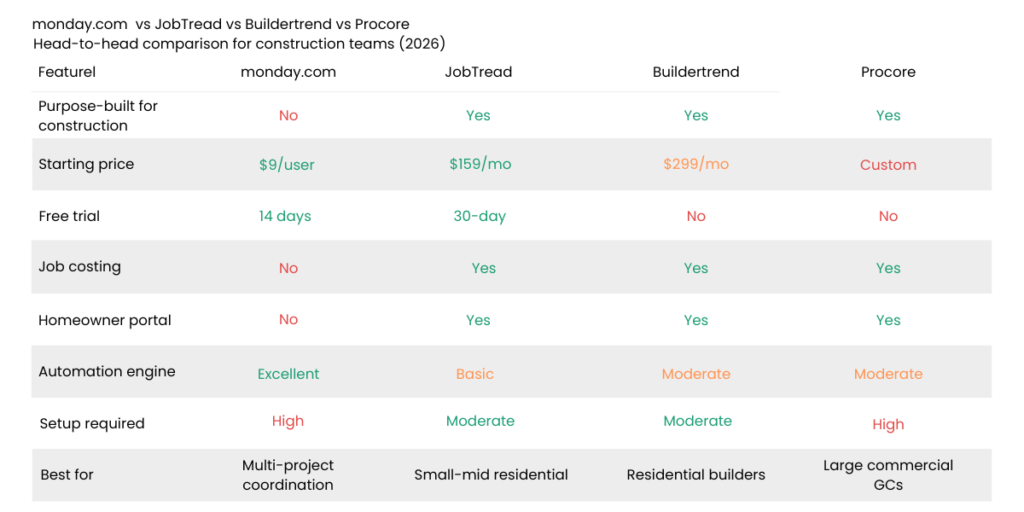
The pricing gap at smaller team sizes is significant. A 10-person team on monday.com Standard pays $1,440 per year.
The same team on JobTread (annual plan) pays approximately $3,852 per year.
Buildertrend’s entry plan starts at approximately $299 to $339 per month, or roughly $3,588 to $4,068 annually, for unlimited users. At team sizes of 5 to 15 people, monday.com costs substantially less than either construction-specific alternative.
What Buildertrend and JobTread offer that monday.com does not is a fully integrated financial layer covering estimating, job costing, and progress billing in one platform.
Contractors who need all of that will find the higher price justified.
For those who already have QuickBooks and need coordination more than financial integration, monday.com’s lower cost and flexibility often make more sense.
Is monday.com the Right Call for Your Business
Monday.com is likely a strong fit if most of these are true for you:
- You manage four or more active jobsites with no single system showing you their status
- You already use QuickBooks for accounting and are not looking to replace it
- Your primary pain is coordination and visibility, not estimating or job costing
- You have at least one person who can own the initial setup and hold the team accountable to using it
- You want to test the tool with your real team before committing any budget
It is probably not the right fit if you need estimating, job costing, or progress billing inside one platform.
The same applies if your field crews are strongly resistant to any technology, or if you need a dedicated homeowner portal for residential clients.
What to Test During Your 14 Days
The 14-day paid trial is the most valuable thing monday.com offers a contractor who is on the fence.
It starts at the Pro level, so you get access to the full feature set including advanced automations and private boards.
Build one real jobsite board using the construction template, then customize it to reflect how your team actually tracks a job.
Use your real tasks, your real subcontractors, and your real status stages. Set up two automations, one for subcontractor deadline reminders and one for status change notifications.
Connect QuickBooks during the trial period.
Then ask two or three field crew members to use the mobile app for a full week on a simplified board with only the columns they need.
By day ten, you will know whether adoption is a manageable challenge or a dealbreaker for your specific team.
Ready to run that test? The 14-day trial starts at the Pro level — full feature set, no credit card required, no commitment. By day 10, you’ll know whether monday.com fits your team or not.
Start Your Free Trial →That test will tell you more than any demo ever could.
If You Need a Construction-Specific Platform
For estimating, job costing, and homeowner portals, JobTread covers what monday.com doesn’t
monday.com is a coordination layer, not a construction platform. If you need built-in estimating, real-time budget tracking, or a dedicated homeowner portal, JobTread is purpose-built for residential builders, remodelers, and small-to-mid contractors at $159/month on the annual plan. Different tool category, different trade-offs — worth comparing if monday.com’s coordination focus doesn’t cover your full workflow.
Read the JobTread Review →⚡ IF YOU’RE A DESIGN-BUILD FIRM OR RESIDENTIAL DESIGNER
Houzz Pro covers the front end – leads, 3D design, and homeowner portal that monday.com doesn’t
monday.com is built to give you visibility into projects you already have. If your business model also depends on winning new design-driven clients – kitchen and bath remodels, custom builds, or design-build renovations – Houzz Pro adds what monday.com doesn’t: marketplace access to 65 million monthly homeowners, industry-leading 3D rendering tools, and a dedicated homeowner portal. Starting at $149/month, it’s the platform for design-led residential operations.
Frequently Asked Questions
Is monday.com good for construction companies?
Yes, with the right expectations. It excels at multi-jobsite coordination, subcontractor tracking, scheduling, and team communication.
The platform does not include estimating, job costing, or homeowner portals.
Does monday.com have a construction template?
Yes. The platform offers construction templates for project tracking, subcontractor management, and site coordination. They are a solid starting point and require customization for your specific workflows.
What does monday.com cost for a 10-person construction team?
On the Standard plan with annual billing, a 10-person team pays $120 per month or $1,440 per year.
Does monday.com integrate with QuickBooks?
Yes. Most construction teams run monday.com for coordination and keep QuickBooks handling the accounting. The integration syncs data between both systems without manual entry.
Can field crews use monday.com on mobile?
Yes. The iOS and Android apps work well for tech-comfortable users. Field adoption is easier when crew-facing boards are kept simple with only the columns they need.
How long does setup take?
A basic setup for a 5 to 10 person construction team takes roughly 20 to 40 hours of internal time. More complex setups take longer. Most companies do not need a consultant, but the time investment is real.
What is the best construction software alternative to monday.com?
For residential builders and remodelers, JobTread or Buildertrend are the strongest options. Large commercial contractors are better served by Procore or Autodesk Construction Cloud.
Disclosure: This article contains affiliate links. If you purchase software through our links, we may earn a commission at no additional cost to you. This does not influence our reviews or recommendations.