Procore vs Buildertrend (2026). Which Platform Actually Works for Residential Builders and Remodelers?

If you have been going back and forth between these two platforms for more than a week, you already know the frustration. One company will not show you a price until you sit through a sales call. The other keeps raising its rates at renewal, and the reviews you find online contradict each other enough to make any decision feel like a guess. What you actually need is a straight answer for a residential operation your size, not a breakdown written for a commercial contractor managing a $50 million build.
So here is that answer. Procore targets large commercial general contractors running complex, multi-stakeholder projects. Buildertrend targets residential builders, remodelers, and small-to-mid-sized contractors. If you run a residential or remodeling business with a crew under 25 people, you can almost certainly stop researching Procore and spend your time figuring out whether Buildertrend fits your workflow and your budget.
Procore vs Buildertrend at a Glance
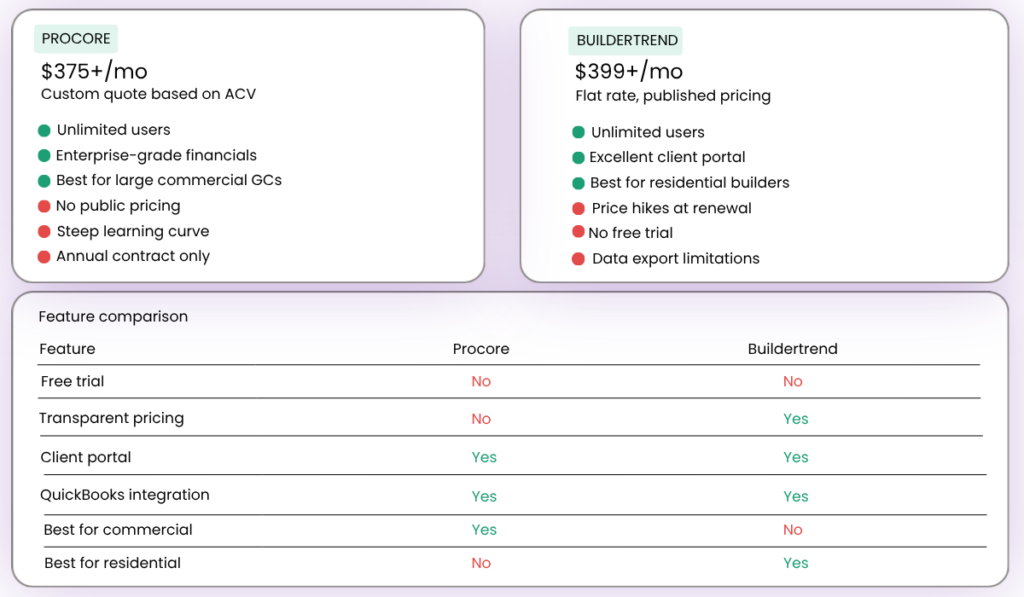
| Procore | Buildertrend | |
| Best for | Large GCs, commercial and enterprise | Residential builders and remodelers |
| Starting price | ~$375/month (custom quote) | ~$399/month (custom quote) |
| Pricing model | Annual Construction Volume | Flat monthly subscription |
| Free trial | No | No |
| Unlimited users | Yes | Yes |
| Mobile app | iOS and Android | iOS and Android |
| QuickBooks integration | Yes | Yes |
| Client portal | Yes (commercial-focused) | Yes (homeowner-focused) |
| Ease of use | Moderate to complex | Moderate |
What You Will Actually Pay
Procore
Procore does not publish standard pricing. Your cost depends on your Annual Construction Volume, which is the total dollar value of construction work your company manages per year. For a residential contractor doing $1 million to $5 million annually, the floor for a Procore quote typically starts around $375 per month. That figure sounds workable until you realize that most contractors at that price point are on Procore because a commercial client required it. Contractors who choose the platform independently commonly report paying $10,000 to $60,000 per year or more, depending on the modules they select.
A few things about Procore’s pricing structure are worth understanding before you get on any sales call.
- No per-user fees. Your entire team accesses the platform under one subscription.
- Annual contracts only. Procore does not offer a month-to-month option.
- Unlimited data storage and 24/7 support are included at all plan levels.
- Price increases at renewal are a documented complaint among long-term users. If you are seriously considering the platform, ask about the renewal rate lock option before you sign anything.
Buildertrend
Buildertrend used to publish fixed pricing tiers directly on its website. That has changed. The company now walks new customers through a short questionnaire and then schedules a call before sharing a quote. The figures below reflect current pricing from third-party research and contractor reports. Treat them as a realistic estimate and confirm the exact rate with Buildertrend directly before you commit.
| Plan | Monthly Billing | Annual Billing (Effective Monthly) |
| Essential | ~$399/month | ~$339/month (~$4,788/year) |
| Advanced | ~$699 to $799/month | ~$499 to $599/month |
| Complete | ~$1,099/month | ~$829/month |
All plans include unlimited users and unlimited projects. New customers typically receive approximately $300 off their first month. Buildertrend also offers around 10% off for paying the full annual subscription upfront.
Budget planning for Buildertrend needs to account for its history of price increases. Some contractors who started on the platform at $99 to $199 per month in 2018 and 2019 now report paying three to five times that amount. Increases of 50% to 65% in a single renewal cycle are documented by multiple verified users. Before you sign, ask for the maximum annual increase to be capped in your contract and get that commitment in writing.
One more pricing reality matters before you choose a tier. Most residential contractors running multiple active jobs will need the Advanced plan, not the Essential. The Essential plan covers scheduling, basic communication, and simple invoicing. Estimating, formal change order workflows, and detailed job costing all sit behind the Advanced tier. Most builders and remodelers managing four or more simultaneous jobs will outgrow the Essential plan within their first few months.
Features That Matter for Residential Work
Scheduling and Project Visibility
Both platforms cover core scheduling. Buildertrend uses drag-and-drop Gantt charts and calendar views, with waterfall scheduling that prevents tasks from starting before earlier ones are complete. That structure fits a sequential residential build naturally. Procore’s scheduling tools are more powerful and configurable. That power targets multi-phase commercial projects with dozens of stakeholders, not a residential pipeline of 5 to 10 active jobs.
Client Communication
Buildertrend’s homeowner portal is one of its most practical features for a residential operation. Clients log in to see project progress, review and approve change orders, make material selections, and check job site photos. This is the feature that stops the daily “what’s the update?” texts. Procore also includes client-facing tools, but those tools target commercial project owners and investors rather than individual homeowners. For residential work, Buildertrend has a clear practical edge here.
Financial Tools and QuickBooks Integration
Both platforms connect to QuickBooks, but the depth of that integration matters for your daily workflow. Buildertrend syncs invoices, change orders, cost codes, and purchase orders directly with QuickBooks Online and QuickBooks Desktop. The sync works, but it requires careful initial setup. Some users report data matching errors when the two systems fall out of alignment. Plan time for initial configuration before you expect it to run reliably on its own. Procore’s QuickBooks integration exists but suits the more complex accounting structures that large commercial operations require.
Buildertrend’s financial tools include estimating with digital takeoff, change order management, budget tracking against actual costs, and purchase orders. These are the tools that help you stop losing revenue on forgotten change orders and underestimated jobs.
Mobile App and Field Access
Both platforms have mobile apps for iOS and Android. Field crews can log daily reports, upload photos, track time, and manage job site documents from their phones. Field workers generally find Buildertrend’s app easier to pick up with minimal training, which matters when you are trying to get a 10-person crew using new software. Procore’s app is more capable but takes more time to learn effectively in the field. Some users report that the Buildertrend app occasionally crashes or fails to load. Testing the mobile experience as part of your demo is worth the time before you commit.
Crew Adoption: The Question Most Contractors Are Really Asking
The feature list matters less than whether your crew actually uses the software. Neither Procore nor Buildertrend is plug-and-play. Both require onboarding and learning time before a team reaches full productivity. Procore has a steeper learning curve because of its modular depth. Most teams need dedicated training before getting consistent daily value from the platform. Buildertrend is generally easier to learn, though many users find the interface feels busy in the early weeks and navigation takes time to become natural.
More features in a platform rarely translate to faster adoption. For a small residential team, the right choice is the platform your crew can get comfortable with in weeks, not months. On that measure, Buildertrend is the more realistic option. Procore backs its platform with a user community of more than 40,000 professionals and 24/7 support, which helps with training resources. Buildertrend offers support too, but user reviews on support quality run more mixed, with some contractors reporting slow response times and inconsistent assistance.
The Data Portability Problem Worth Knowing Before You Commit
Before you commit to Buildertrend, one issue warrants direct attention. Multiple verified user reports confirm that Buildertrend does not offer a bulk data export option. Cancelling after a year or two of active use means retrieving your project files, photos, and customer records through a manual, item-by-item process. At least one user reported having to continue paying for a subscription they no longer wanted just to keep access to years of historical project records.
This is not a small inconvenience. It is a genuine lock-in risk, and it is worth raising directly with Buildertrend before you sign. Ask specifically about data portability and try to get export rights confirmed in writing as part of your contract negotiation.
Procore vs. Buildertrend comparison
Who Should Use Procore
Procore makes sense for your business if your situation matches most of the following.
- You run a general contracting company managing large commercial or infrastructure projects.
- You need enterprise-grade financial tools with deep reporting across multiple project stakeholders.
- You manage projects that involve owners, architects, engineers, and multiple subcontractors working simultaneously.
- You have a large team and want unlimited users under one annual subscription.
- Your annual construction volume justifies a $10,000 to $60,000-plus per year commitment.
Procore is likely not the right fit if any of the following apply.
- You run a small residential building or remodeling business.
- Predictable monthly pricing matters to your planning.
- Budget is a constraint and a five-figure annual commitment is not viable.
Who Should Use Buildertrend
Buildertrend fits most residential operations if the following describe where you are right now.
- You run a residential building or remodeling business with a crew of 4 to 25 people.
- You need a homeowner portal that gives clients real-time project visibility and stops the daily update calls.
- You want a platform that connects to QuickBooks with a manageable setup process.
- You need scheduling tools built for sequential residential builds with task dependencies.
- You want flat-rate subscription pricing that does not climb as your crew grows.
The platform is likely not the right fit if any of the following concern you.
- You manage large commercial projects with complex, multi-stakeholder financial reporting needs.
- Data portability and the ability to take your records with you when you leave matters to you.
- You want pricing stability without the risk of significant rate increases at renewal.
Other Platforms Worth Considering
If Buildertrend feels too expensive or too heavy for where your business is right now, two alternatives stand out. JobTread has grown into one of the fastest-growing construction software companies in North America. It offers transparent per-user pricing starting at $159 per month on an annual plan, with all features included in one tier and no upgrade required. The platform integrates with QuickBooks, and for a team of 10 internal users on an annual plan, the total runs approximately $321 per month. That sits well below Buildertrend’s Advanced pricing. Monday.com offers construction-focused templates at a lower starting price, but it lacks the residential-specific tools most home builders and remodelers rely on. That includes a purpose-built homeowner portal.
Questions Residential Builders Actually Ask
Is Procore worth it for a small residential contractor? For most residential builders doing under $5 million annually, the cost, complexity, and commercial-first design make Procore difficult to justify. Platforms built specifically for residential work offer better value and a faster path to actual adoption.
Which Buildertrend plan do I actually need? Most contractors running multiple active jobs will need the Advanced plan. The Essential plan covers scheduling and basic client communication, but estimating, change orders, and detailed job costing all sit behind the Advanced tier.
Does Buildertrend really sync with QuickBooks automatically? The integration works, but it requires careful setup to keep data aligned. Expect to spend time on initial configuration, and confirm that your specific QuickBooks version is fully supported before signing up.
What happens to my data if I cancel Buildertrend? Buildertrend does not offer a bulk download option. Multiple verified users have confirmed that cancellation requires manual, item-by-item data export. Negotiate data portability terms before you commit.
Does Procore have a free trial? The main Procore platform does not offer a free trial. You can request a demo through their sales team, which sets up a configured account for you to review.
Does Buildertrend have a free trial? Buildertrend does not offer a free trial. New customers typically receive approximately $300 off their first month. Confirm the current terms with their sales team before you get on a call.
Can my field crew use Buildertrend on their phones? Yes, the platform has iOS and Android apps for logging daily reports, uploading photos, and tracking time from the job site. Some users report occasional performance issues with the app, so test the mobile experience during your demo before committing.
Is Buildertrend good for remodelers, or mainly for new home builders? Buildertrend serves both groups well. Its scheduling tools, change order management, and homeowner portal all apply directly to remodeling work. Remodelers rank among its most active and satisfied user groups.
Disclosure: This article contains affiliate links. If you purchase software through our links, we may earn a commission at no additional cost to you. This does not influence our reviews or recommendations.