Procore Review 2026: An Honest Verdict for the $5M to $30M General Contractor

| Rating | ⭐⭐⭐⭐ 4 out of 5 |
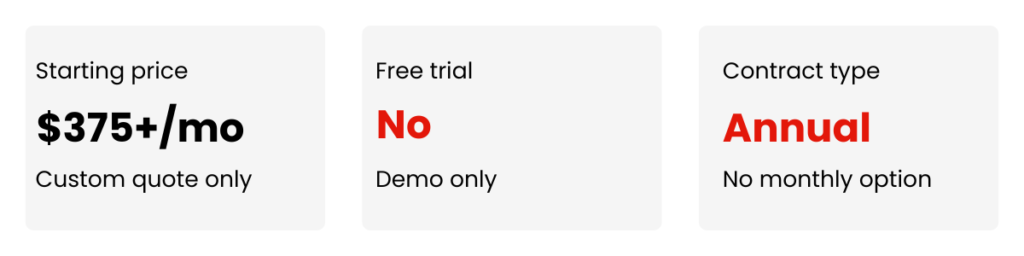
| Starting Price | ~$375/month, custom quote based on annual construction volume |
| Pricing Model | Annual Construction Volume (ACV) |
| Free Trial | No full trial. Limited free account for US and Canada users. |
| Best For | Mid-size to large general contractors on commercial projects |
| Not Ideal For | Small contractors, residential remodelers, or anyone who wants pricing before a sales call |
You’re running four or five active jobs at somewhere between $5M and $30M in annual volume. The system you have been relying on is starting to cost you real money.
Budget numbers change depending on who you ask. RFIs sit in someone’s inbox for two weeks without anyone flagging them. Your field crews work off drawing versions that were superseded three revisions ago. You spend two hours every Friday piecing together a project status update you should be able to pull in five minutes.
You have probably heard of Procore. Maybe you’ve even had a demo. The sales rep was helpful, told you they’d send a proposal, and you still don’t have a real number.
This review gives you the straight picture before you walk into that next conversation. What Procore costs, what it actually does, where it falls short, and whether a company at your volume gets real value out of it.
What Procore Actually Costs
Procore’s pricing model is the first thing that trips contractors up, and for good reason. Instead of charging per user or per project, Procore bases its price on your Annual Construction Volume. That is the total dollar value of the work you run through the platform each year. You also pay separately for the product modules you select.
This model has one significant implication. Your costs go up as your business grows, even if you are not adding users or doing anything different with the software. That frustrates a lot of contractors, and it is a legitimate frustration to have.
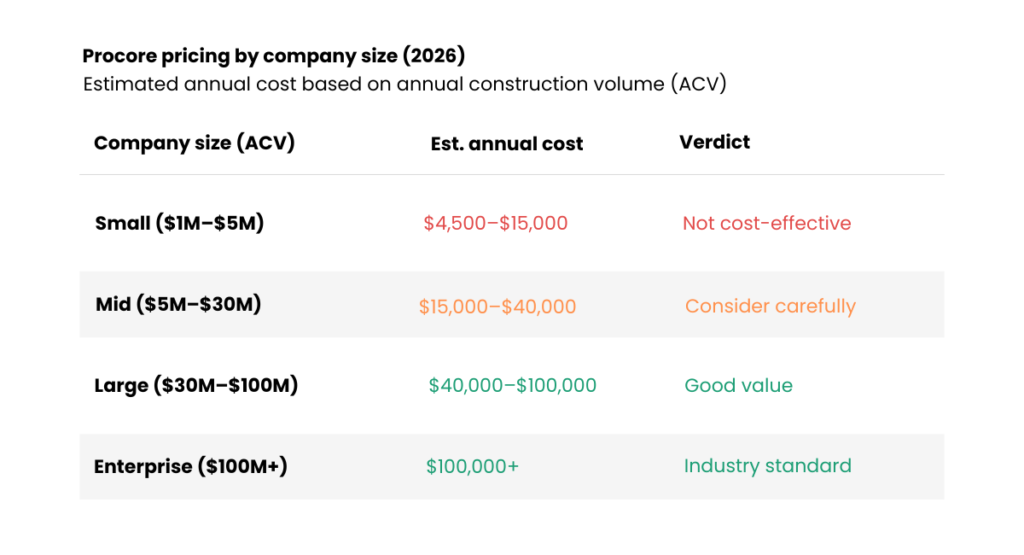
Procore does not publish its pricing. The figures below come from contractor-reported data and industry analysis. Treat them as working estimates, not published rates.
| Company Size (ACV) | Estimated Annual Cost | Included in All Plans |
| Small ($1M to $5M) | $4,500 to $15,000 per year | Unlimited users |
| Mid-size ($5M to $30M) | $15,000 to $40,000 per year | Unlimited storage |
| Large ($30M to $100M) | $40,000 to $100,000+ per year | 24/7 customer support |
| Enterprise ($100M+) | Custom, often $100,000+ per year | Annual contract required |
Procore pricing by company size 2026
What the Annual Cost Looks Like Against Your Real Losses
That $15,000 to $40,000 annual number looks significant until you put it next to what bad information flow actually costs a mid-size GC in a year.
A single undocumented change order on a $4M job can cost $20,000 to $50,000 in margin disputes. When an RFI sits in someone’s inbox for two weeks and a crew keeps working off the wrong assumption, the rework costs real money. A subcontractor can claim they never received the updated drawings. Without a timestamped record proving they did, you have no way to win that dispute.
Most contractors who run the numbers honestly find the software pays for itself if it prevents two or three of those scenarios per year. Asking whether $20,000 is a lot of money is the wrong frame. The real question is whether $20,000 is more or less than what your current system is already costing you.
The Renewal Pricing Problem
Multiple long-term Procore users report a consistent pattern. Feature bundles that contractors paid for in one contract sometimes appear as separate, higher-priced add-ons at renewal. One contractor with more than a decade on the platform described pricing as manageable in the first several years, with recent multi-year renewals arriving significantly higher.
If you move forward with Procore, get specific renewal terms in writing before you sign. Ask your sales rep what the rate structure looks like in years two and three, not just year one.
What You Get for That Money
Procore organizes its platform into four modules. Most mid-size contractors start with Project Management and Financial Management, then add Quality, Safety, and Field Productivity as the team builds confidence in the platform.
Project Management
The project management module is where most contractors spend the majority of their time. Key capabilities cover these areas.
- Document and Drawing Management. All project files, drawings, and specifications live in one place with version tracking, markup tools, and permission controls. When you upload PDF drawings, Procore uses optical character recognition technology to auto-populate drawing titles, numbers, and disciplines, and to enable text search across the full drawing set. Every stakeholder always sees the current version, which eliminates the wrong-drawing problem that triggers expensive rework on the job site.
- RFI and Submittal Tracking. Create, route, and track requests for information and submittals through automated workflows with deadline alerts. On complex projects with 100-plus active RFIs, this is consistently the most praised feature in the platform.
- Punch Lists. Add observations, attach photos, and tag team members directly on drawings from the field, creating a real-time task list accessible to everyone on the project.
- Scheduling. Procore launched its native scheduling tool as a generally available product in February 2026. Teams can now build project schedules from scratch inside the platform, toggle between master schedules and daily lookahead plans, and import existing schedules from Primavera P6 or Microsoft Project. The tool is newly launched, so teams with highly complex CPM scheduling requirements may still prefer a dedicated scheduling application for advanced use cases.
Financial Management
Procore’s financial tools are built for contractors who need real-time cost visibility, not end-of-month reports from the bookkeeper.
- Budget and Forecasting. Live budget dashboards update automatically as change orders move through the approval process. Division-level reporting shows you exactly where each job stands at any given moment, without waiting for anyone to pull a report.
- Change Management. Every potential and approved change to project scope or cost flows through a formal tracking process, creating a complete audit trail. When a subcontractor disputes a scope change, you have a timestamped record of when it was issued and who acknowledged it. That record is your protection in a contract dispute.
- Invoicing and Progress Billings. Procore generates AIA billing documents and pay applications based on work completed, with accounting integrations that reduce manual double-entry.
- Accounting Integrations. Connections are available for QuickBooks, Sage, Oracle, and Viewpoint. The QuickBooks integration has documented limitations that several users flag in reviews, and some Sage users report that purchase orders appear only as direct costs rather than detailed line items in the budget tool. Before committing, have your Procore sales rep walk you through the specific integration behavior for your existing accounting setup.
Quality, Safety, and Field Productivity
- Inspections and Incident Reporting. Run standardized job site inspections and document safety observations from a mobile device, with results syncing immediately to the main platform.
- Daily Logs. Field crews submit daily reports capturing manpower, equipment, weather, and progress directly from the job site. Paper logs and illegible handwriting stay in the past.
- Time Tracking. Employees clock in and out from their phones, selecting the project, cost code, location, and pay type at clock-in. Labor costs tie directly to specific tasks for accurate job costing. A geofencing feature sends automated clock-in reminders when workers enter a designated site perimeter.
- Resource Planning. Assign labor based on skills, certifications, and availability with a drag-and-drop scheduler that shows you who is available and when.

Mobile App
Procore’s mobile app runs on iOS and Android and consistently ranks as one of the platform’s strongest features. Field crews access drawings, submit daily logs, manage RFIs, capture photos, and complete punch list items directly from the job site, even in areas with poor connectivity. Data stores locally on the device and syncs automatically when a connection returns.
Procore designed the large tap targets and offline functionality for real job site conditions, not for an office environment. This is not a desktop application crammed onto a phone screen.
What Users Actually Think
Based on verified reviews across Capterra, G2, Software Advice, and GetApp, Procore holds a 4.5 out of 5 rating from more than 2,600 verified reviews on Capterra as of early 2026. Here is what mid-size contractors consistently report.
What users consistently praise:
- Centralized project documentation eliminates version confusion between office and field
- Mobile app performs reliably under real job site conditions
- Unlimited users and storage deliver genuine value on large team projects
- Change order and RFI audit trails provide real legal defensibility
- 24/7 support is responsive and knowledgeable
- The depth of the feature set covers practically every realistic construction scenario
What users consistently criticize:
- Pricing is high, and the ACV model feels like a penalty for growing the business
- Annual price increases at renewal are a recurring complaint among long-term users
- Steep learning curve for new office users, requiring dedicated onboarding time before full productivity
- QuickBooks and Sage integrations carry documented limitations
- Feature modules can be repackaged at renewal, increasing costs without adding new functionality
- The platform can feel overwhelming for field crews who are new to construction software
| Pros | Cons |
| Most comprehensive construction management platform available | No published pricing. A custom quote is required to start any conversation. |
| Unlimited users and storage on all plans | ACV pricing model increases costs as your volume grows |
| Real-time financial tools that connect field and office | Annual contract with limited flexibility to scale down mid-term |
| 500-plus integrations through the App Marketplace | Consistent user reports of significant price increases at renewal |
| Strong mobile app built for real field conditions | Steep learning curve. Office staff need real onboarding time. |
| Complete audit trails with legal defensibility | Feature modules can be repackaged into higher-cost tiers at renewal |
| 24/7 customer support included on all plans | Cost is hard to justify for small contractors or simple project types |
Is Procore Right for Your Company Size?
The first thing most contractors want to know is whether Procore is built for a company their size. That misconception runs in the wrong direction. Procore targets the $5M to $30M general contractor as one of its core customer segments. If information lives in too many places across your active jobs and it is costing you money, Procore built the platform for exactly that situation.
| Procore is a strong fit if | Procore is likely not the right call if |
| You manage commercial projects with 100-plus drawings or complex RFI workflows | You are a residential remodeler or small specialty contractor |
| You need live job cost visibility without waiting for accounting to run a report | You want transparent, predictable pricing before talking to a sales rep |
| You manage multiple subcontractors and stakeholders per project | Your primary concern is finding the lowest monthly cost |
| You have lost money on an undocumented change order or a drawing version error | You need a system your team can learn in a long weekend |
| You are working toward larger commercial contracts and want to look organized to owners | You want month-to-month flexibility with no annual commitment |
| Your annual construction volume is $5M to $30M and growing | You are doing under $3M a year in volume |
The Real Question About Field Adoption
The most common objection contractors raise is also the most honest one. Spending $20,000 a year on a platform that only the project manager ends up using, while field crews go back to texting photos, is a real risk. It is also exactly what happens when the rollout is poorly managed.
The mobile experience is genuinely designed for the field, with large controls and offline capability. Getting the app to work is not the hard part. The hard part is deciding as a company that the old system is finished. Train the field on one or two specific tasks at a time, not the entire platform at once. Hold to that standard consistently for the first 90 days.
Procore provides implementation support and free training through Procore Academy, including self-paced online courses and role-based certifications. Using these resources, rather than handing field crews a login and hoping for the best, changes the adoption outcome significantly.
If Procore’s pricing model or complexity does not fit where your business is right now, three alternatives are worth genuine consideration.
Buildertrend works best for residential builders and remodelers. Current pricing starts at approximately $339 per month for the Essential plan with annual billing. The platform has a strong client portal, solid QuickBooks and Xero integrations, and a shorter learning curve than Procore. Buildertrend is not designed to handle the RFI and submittal complexity of large commercial projects. For the right operation, it delivers real value at a lower entry cost.
JobTread has gained traction quickly among small-to-mid-size contractors who want strong financial tracking without Procore’s price or complexity. The interface is modern and straightforward, pricing is transparent on the website, and the feature set covers the core job management and financial tracking needs of a contractor doing $2M to $15M in annual volume.
Autodesk Construction Cloud is Procore’s most direct enterprise competitor. If your projects involve heavy BIM coordination and design collaboration, Autodesk’s deep integration with its own design tools gives it a genuine edge in that specific context.
Frequently Asked Questions
Is Procore worth it for a company doing $10M a year?
For a general contractor doing $5M to $30M in annual volume with active commercial projects, the answer is probably yes once you run the numbers honestly. The annual cost of $15,000 to $40,000 looks different when you put it next to what a single unresolved change order dispute or drawing error actually costs. Where it stops making sense is for contractors doing under $3M a year, for simple project types with minimal subcontractor coordination, or for operations where the team is too small to absorb a real onboarding process.
What does Procore actually cost per year?
Procore does not publish its pricing. Contractor-reported estimates put mid-size costs ($5M to $30M in ACV) at approximately $15,000 to $40,000 per year. That figure shifts based on the modules you select. All plans include unlimited users, unlimited storage, and 24/7 support. You will need to enter a sales conversation to get an actual quote for your specific volume.
Does Procore have a free trial?
The full platform does not offer a time-limited free trial. Procore offers a limited free account for US and Canada users. This account lets you view projects and manage bids, but it does not provide access to the full paid feature set. The standard first step is requesting a demo through the sales team.
Does Procore integrate with QuickBooks or Sage?
Yes to both. The QuickBooks integration works but has documented limitations that several users flag in reviews. Sage covers most workflows, though some users report that purchase order data appears only as direct costs rather than detailed line items in the budget tool. Before signing, ask your sales rep to walk through the specific behavior with your accounting setup rather than accepting a generic yes.
How long does it take to get a team running on Procore?
For office staff, plan on four to eight weeks of active use before the platform feels comfortable. Field crews typically need two to four weeks on the mobile app when they receive clear onboarding on the specific tasks they are responsible for. Start with drawings, daily logs, and RFIs. Add additional modules over time so the team builds real habits rather than learning features they immediately stop using.
What is the contract length and can you cancel early?
Procore requires a minimum annual contract. Multi-year agreements reduce your flexibility to adjust plans mid-term, but they typically come with better per-year pricing. Canceling mid-contract generally carries a financial penalty. Before signing, get your renewal terms in writing and ask specifically what rate increases look like at the end of year one.
Disclosure: This article contains affiliate links. If you purchase software through our links, we may earn a commission at no additional cost to you. This does not influence our reviews or recommendations.