Buildertrend Review (2026): Is It Worth It for a Small Residential Contractor?

If you run three to eight residential jobs at once and still field every homeowner call personally, Buildertrend directly addresses those problems. Its feature set targets the client communication drain, the QuickBooks reconciliation headache, and the documentation gap that comes with running a small residential crew. The client portal is purpose-built for homeowner communication, and verified users consistently identify it as the platform’s standout feature. Its QuickBooks sync works reliably for most contractors. Scheduling tools reflect how residential trades actually sequence work, not how generic project management software assumes they should.
Two things deserve clear attention before you sign anything. Pricing has climbed dramatically over the past several years. Some long-term customers now pay two to five times their original rate for comparable features. Data portability creates real friction, and once your project history lives inside Buildertrend, leaving the platform takes significant effort. Understand both of those realities before you commit, and you can evaluate the platform on its actual merits.
For residential builders and remodelers who go in with clear eyes on the contract terms, the depth of features here is hard to match. Few platforms in this category cover as much ground for residential work specifically. The platform earns a solid four out of five.
What You Need to Know About Pricing Before Anything Else
Current Pricing
Buildertrend does not publish prices publicly. The figures below reflect what multiple independent sources report as of early 2026. Actual pricing depends on contract length, timing, and what you negotiate.
| Plan | Standard Monthly | Annual Monthly | What It Covers |
| Essential | ~$399/month | ~$339/month | Scheduling, daily logs, client portal, basic invoicing, QuickBooks and Xero sync, unlimited users |
| Advanced | ~$699/month | Custom | Everything in Essential plus detailed estimating, change orders, and real-time job costing |
| Complete | ~$1,099/month | Custom | Everything in Advanced plus lead management, warranty tools, document builder, and premium support |
All three plans include unlimited users and unlimited projects with no per-seat fees. Subcontractors access the platform through a free invitation, meaning your subs can view relevant job information without adding to your subscription cost. That flat-rate model matters most if you have priced out platforms that charge $40 to $60 per user per month.
Buildertrend does not offer a traditional free trial. You pay to get started. The platform does offer a 30-day money-back guarantee, and new customers often see a first-month promotional rate around $199 on the Essential plan. Ask about both before you commit.
The Pricing History
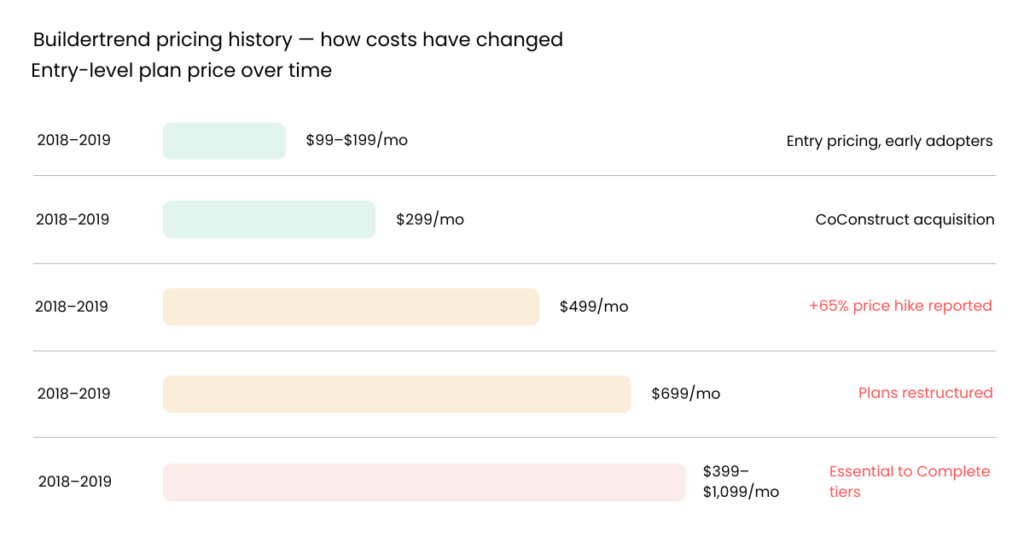
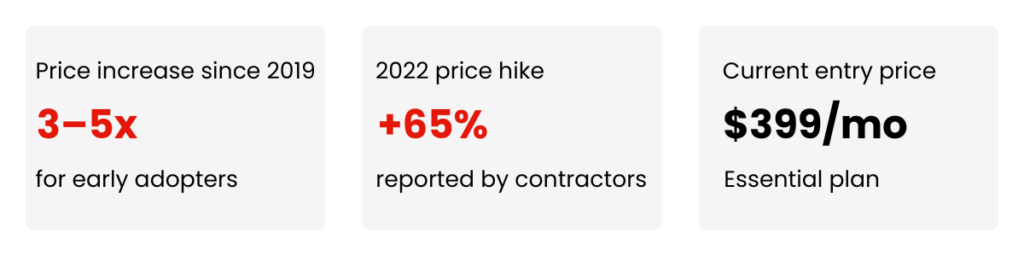
Entry-level Buildertrend pricing sat between $99 and $199 per month in 2018 and 2019. That is roughly what many long-term users paid when they first signed up. By 2022, multiple verified contractors reported renewal increases of 50 to 65 percent. Some legacy plans introduced per-user fees during that period. Current Essential plan pricing sits at roughly two to five times what early adopters originally paid for comparable core features.
Buildertrend does not publish its pricing history and has no stated policy limiting future increases. If you have ever gotten comfortable with a software tool and then taken a major price hike when you were too embedded to move, that scenario has played out repeatedly on this platform. The 2021 acquisition of CoConstruct removed the main competing platform in the residential construction software market, and prices have continued to climb since. Ask your sales representative what your renewal rate will be at the end of your first contract term. Get that answer in writing before you sign.
The Data Portability Warning
At least one verified reviewer in December 2025 reported that Buildertrend has no self-serve bulk data export. After several years of project history, extracting files, photos, proposals, and client records means going item by item. Buildertrend’s terms allow the company to assist with data extraction for a fee within one year of cancellation. That is not the same as owning your records cleanly.
Before you commit, ask specifically what a complete export of your project files, photos, and financial records looks like. Ask what that process costs if you decide to leave.
The Features That Actually Matter for a Residential Operation
The Client Portal
The homeowner portal is where Buildertrend separates itself from most competing platforms in this category.
Your clients get a branded portal where they see the current project schedule, progress photos, pending change orders, payment status, and material selections. Approvals happen digitally, so a homeowner can sign off on a change order from their phone. Automated notifications fire at project milestones, and clients get updates without you composing a single message.
For a contractor currently spending an hour or two a day fielding the same three questions from different homeowners, the portal is not a nice-to-have. It directly addresses the most common time drain in small residential operations. Contractors who use it consistently report a noticeable drop in inbound client communication within the first few weeks of active use.
Scheduling, Daily Logs, and Getting Your Crew to Document Anything
Buildertrend’s scheduling tools use drag-and-drop Gantt charts with task dependencies, and you can set tasks so they cannot start until preceding work is complete. Multiple calendar views let office staff and field crews look at the same project from whichever angle they need.
The daily log feature is particularly valuable for contractors whose crews currently document nothing. Field crews can submit logs from their phones with photos and weather notes without sitting at a desk. One verified reviewer named the daily log as the single feature that saves the most time each week. It keeps records of site visits and meeting notes with photos attached, without anyone needing to be at a computer.
The realistic caveat is that software does not create habits on its own. Getting your foreman to submit the daily log before leaving the site is a management challenge that Buildertrend does not solve for you. The tool exists. Making it a routine on your crew is your job.
Job Costing and the QuickBooks Sync
Contractors consistently rank the QuickBooks integration as the most praised feature across verified reviews. It syncs with both QuickBooks Online and QuickBooks Desktop. When configured correctly, it eliminates double entry on invoices, cost items, and payroll.
The job costing feature tracks budget against actuals in real time. You can see a cost overrun developing mid-job rather than discovering it after closeout. Some users find the job costing interface harder to navigate than it needs to be, and accurate tracking requires upfront setup work. For a contractor who currently cannot tell whether a job made money until weeks after closeout, even an imperfect real-time view is a meaningful improvement.
Change orders that receive digital client approval automatically update the project budget. That approval-to-budget chain addresses one of the most common ways small residential operations lose margin on jobs that should have been profitable.

The Mobile App and Whether Your Crew Will Use It
Buildertrend’s mobile app runs on iOS and Android. Verified field reviews describe it as reliable for daily use. Photos upload quickly on Android devices. Crews can clock in and out with GPS stamping, submit daily logs, and access job files without needing a computer. Users specifically note not having to log in repeatedly throughout the day, which matters when clocking in and out across multiple jobs.
One practical limitation worth noting is that the platform has limited offline functionality. In areas with poor cell signal, some features may not load reliably until connectivity returns.
Two complaints appear consistently across verified reviews. First, switching between jobs while clocked in is more cumbersome than it needs to be. The app can make it unclear which job you are currently viewing versus which job you are clocked into. Second, the notification system generates excessive daily emails. Some users report two to three daily messages about client activation and subcontractor insurance expiration that they cannot disable despite changing notification settings.
The harder question is not whether the app works. Whether your crew will adopt it consistently in the field is what determines whether you get your money’s worth. Buildertrend includes unlimited training sessions at no extra cost on all plans, and that support makes a real difference during the first few months. The platform also offers a premium onboarding program called Buildertrend Boost, which includes a dedicated coach, data migration help, and account setup. Monthly subscribers pay approximately $100 extra per month for it. Annual subscribers get Boost included at no additional charge.
Crew adoption does not end at the training session. Keeping the habit alive in the field is a leadership decision, not a software feature.
What Real Contractors Say
The table below reflects recurring themes from verified contractor reviews across major review platforms.
| What contractors consistently praise | What contractors consistently criticize |
| Client portal dramatically reduces homeowner call volume | Price increases year over year, with verified reports of 50 to 65 percent renewal hikes |
| Daily logs with photo documentation keep projects properly recorded | Job costing is functional but harder to navigate than it should be |
| QuickBooks integration works reliably once configured | Notification system generates excessive daily emails many users cannot disable |
| Unlimited training support helps teams reach productive use faster | Limited offline functionality and occasional mobile syncing delays |
| Mobile app holds up well for consistent field use | No self-serve bulk data export if you want to leave the platform |
| Regular product updates address ongoing user feedback | Interface can feel cluttered for new users learning the platform |
| No per-seat pricing keeps costs predictable as the team grows | Annual price increases have continued with no stated cap |
The pattern across reviews is consistent. Contractors who stick with Buildertrend past the first few months tend to keep it. The features that solve daily problems, specifically the client portal, the daily log, and the QuickBooks sync, deliver visible results. Most regret comes from contractors who felt blindsided by renewal pricing they did not fully understand when they signed up.
Is Buildertrend the Right Platform for Your Business?
Buildertrend is likely the right call if most of these apply to your situation.
- You are a residential builder, custom home builder, remodeler, or specialty contractor
- Your business does $500K to $20M or more per year in residential construction volume
- Reducing homeowner call volume is a real daily problem and the client portal addresses it directly
- You need a reliable QuickBooks or Xero sync that eliminates double entry
- You want a single platform covering sales, project management, and financials
- You are ready to manage crew adoption as an ongoing process, not a one-time training event
These factors point toward a different platform.
- Your business does under $500K per year in annual construction volume
- Budget predictability is a priority and the pricing history concerns you more than it reassures you
- You need clean self-serve data portability and a clear exit path if you decide to move on
- You manage large commercial or infrastructure projects requiring enterprise-level reporting and RFI tools
- You need SOC 2 compliance for clients who require it as a vendor prerequisite
Four alternatives deserve a direct comparison before you commit.
- JobTread. The most relevant alternative for small to mid-sized residential contractors. Transparent pricing, strong data portability, and an interface many contractors find easier to adopt than Buildertrend. If the pricing trajectory is your main concern, this is the platform to compare first. [Read our full JobTread review.]
- Procore. Better suited to large general contractors managing commercial or enterprise-level work. More complex, significantly more expensive, and built for a different scale of operation than the typical residential remodeler. [Read our full Procore review.]
- monday.com for Construction. More flexible and lower in starting price. Less construction-specific but more adaptable for contractors who want to customize workflows. [Read our full monday.com for Construction review.]
- Contractor Foreman. Budget-friendly, includes a free trial, and covers core project management needs at a substantially lower price point
What to Ask Before You Sign
Buildertrend pros & cons
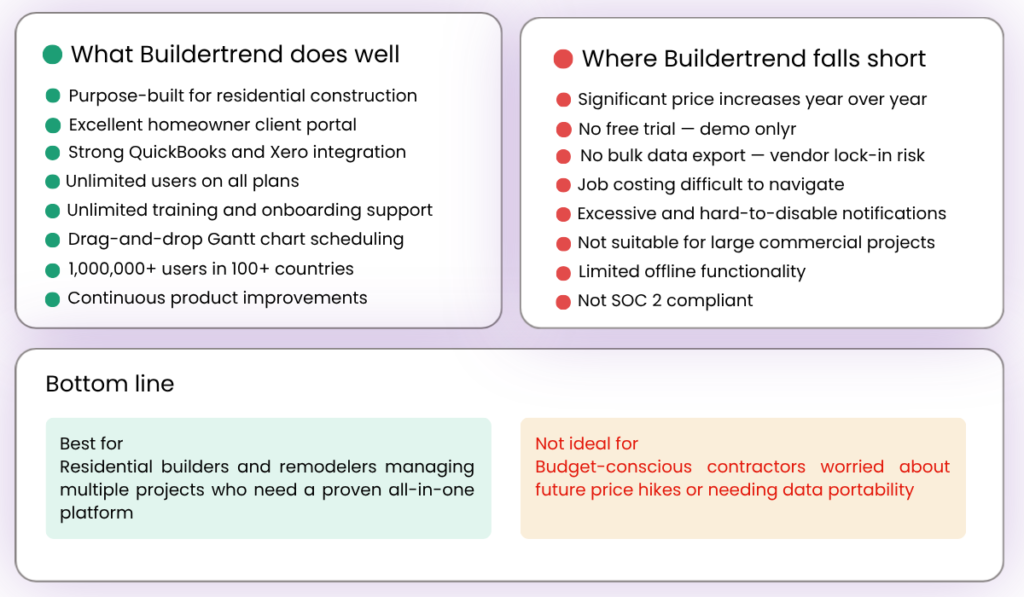
Buildertrend is a mature platform with a real track record in residential construction. For the right business, it delivers measurable results. The questions below are not reasons to avoid the platform. They are the questions a contractor with your risk profile should have clear written answers to before committing.
Ask what your renewal rate will be at the end of your first contract term. Get that answer in writing, not just in a sales call.
Ask what a complete export of your project data looks like if you cancel in two years. Specifically ask about photos, proposals, financial records, and client information. Ask whether there is a cost to that extraction and what the timeline looks like.
Ask whether the first-month promotional rate and the 30-day money-back guarantee are currently available. Confirm exactly what the money-back process requires before you pay a dollar.
Buildertrend itself is a strong platform. The contract terms are where the real risk lives for this type of buyer. Walking into that conversation prepared is the difference between a good outcome and a costly one.
Disclosure: This article contains affiliate links. If you purchase software through our links, we may earn a commission at no additional cost to you. This does not influence our reviews or recommendations.
One Comment